
Activity is a whole new way to interact with content, ideas, and each other on CAN. It builds on novel ideas from the early web and focuses on what matters most—the community and our interaction with each other. It acts as a connective tissue and a system of nutrient dispersal, a live record of energy that flows both from the work out into the world and back into the community, helping projects self-seed and ideas to pollinate, flower, and flourish into new works.
Whenever you submit a project, update a location, share a social media link, or save a project, it is recorded in Activity. Others can interact with it, rediscover it, or save it for themselves. You can also post directly in Activity, share the latest project, p5js experiment, video or audio. It is run by humans for humans and operates entirely without algorithmic curation or filtering. It is animated by our members—not by compute clusters—in service of our global community of creators and thinkers.
Activity is only available to CAN Members.
428
638 271 via API
4,292
- 21/09/2026, 17:28 @Filip posted: Fun take on Slit Scan by Bradley Tangonan. If interested in Slit Scan, Golan has been keeping track, dating back to 191…
- 21/09/2026, 17:04 @Filip posted: Weapons of Mass Distraction – Mario Klingemann #nft → https://www.raster.art/artwork/quasimondo-2026-by-mario-klingemann
- 21/09/2026, 16:17 @Filip posted: A(BSURD) AND D(ISTORTION) by Henry Chu → https://henryc.hu/a-bsurd-and-d-istortion
- 21/09/2026, 16:04 @Filip posted: "Kiss/Crash" by Adam Cole — Eagle Wharf Gallery, London, Winter 2023 → https://www.adamcole.studio/work/kiss-…
- 21/09/2026, 13:27 @Filip posted: 128KB is a platform for Creative Coding within Limits → https://128kb.eu/by @timrodenbroeker
- 21/09/2026, 13:21 @Filip posted: Flow | Mediations by @ritesh #threejs → https://www.zenaranya.xyz/projects?project=flow
- 21/09/2026, 11:57 @Filip posted: New from Gentle Systems: Anatomy of Bingo #robotics → https://www.gentle.systems/page/anatomyofbingo
- 21/09/2026, 09:49 @blendi saved Tessera – A file network with no infrastructure
- 21/09/2026, 01:41 @heestand_xyz changed Location to Tokyo.
- 20/09/2026, 15:23 @wayoutteam updated bio.
How does Activity work?
Submit Project/News → Activity
When you create a new project, this action (or we can call it action) is posted to Activity. It is recorded as a Draft and your project is waiting for the Editor to be published. Once it’s published, it’s once again recorded in Activity. Other Members can comment on it, tag other members, etc. Sometime you will also see Updates to articles/projects, these will appear in Activity too, keeping everyone in the loop.
Comment Projects → Activity
When you comment on a project it is recorded in Activity but it is also recorded in that project’s Activity Log. You can find that at the bottom of every article. There is a good example here. They are a little like comments but in fact they are entries in Activity. From here (any post on CAN) you can also add new comments, tag other members @username and your comment will be posted with the project card in Activity.
Actions → Activity
There are many other things we do on CAN that are considered actions. The first thing you do is become a Member, an action recorded by the System in Activity. You may then update your profile, also recorded in Activity. You may then add a location, recorded in Activity but this time utilising d3.js to show the location on a map. Let’s call these cards. We will build new cards as we go but we have a few already. Similarly, signing up to the newsletter is also recorded in Activity. Your actions on CAN that we would not consider sensitive, e.g. changing a password/name, are recorded in Activity.
Daps in Activity
Daps is our answer to ‘likes’ in Activity. Contrary to the attention / visibility metric which only aim is to nudge the content higher, Daps # are semi-private. By keeping this button metric transparent only to the receiver, we create a direct connection—person to person—without any public display or performance. The action becomes a private acknowledgment, a subtle nod of appreciation. Finally, we have also added a dap ratio bar: the metric between the daps you give and those you receive. There’s no guilt, no target. The interpretation of this metric is entirely yours.
Save → Activity
Whenever you save a project, event, person (People), tool or another member to your Saved it will be recorded in Activity. This is a great way for other members to discover CAN’s archives or other members –– the best way to learn, from each other!
Deleting Actions in Activity
You are now able to delete your own Actions in Activity at any time. On the right side of each entry you will find •••. Simply click it and hit delete. Your Action will be permanently removed from Activity.
Filters in Activity
Use the filters in Activity to filter which type of actions you would like to focus on. You can select more than one and your selection will be remembered so next time you visit you will only see those actions.
Channels in Activity
See what the latest topics are, start a brand new one of your own, or contribute your thoughts to existing conversations happening right now. Use it for projects, subject areas, or current issues.
Commenting in Activity
Whatever you comment in Activity it will be published in Activity but also visible on your Profile page in the Activity Log. Every member now has an Activity Log at the bottom of their profile page. You can see one here if you scroll to the bottom. It shows all the recent interactions and other Members’ comments, projects or taxonomy. Comments on other members’ comments on projects are treated as comments to the comment and not the project/post. This is an important distinction. A chatter between two members in Activity, regardless of the source of chatter, will not be linked to the source of the chatter, i.e the project or member activity.
Notifications
Whenever someone mentions you in a comment (@username), post or activity, you will see that comment in bold in the sidebar under a new section titled Activity Mentions. You will also see a little dot appear in the top right corner of the website indicating that you have an unread mention. Click on the mention in the sidebar and it will take you to that entry in Activity. It will also mark that mention as read. Email notifications are only sent out if the mention remains unread after a few days. We try to keep these to a minimum by giving you a chance to mark them read yourself before emailing you.
Publish → Activity
You can now also publish 500-character entries directly in Activity. Your entries can include all kinds of different media as attachments (cards). If you use #channel, your post is automatically added to that channel. If you use @username, then the person you tagged will be notified. We have also integrated recent Activity contributors that appear as soon you start typing a @username. You can add p5js live sketches, websites, NFT artifactUri, videos, audio, gifs, etc. Big social platforms are not permitted (URLs to tweets/posts etc), not because we don’t want to, but because they purposely make this very difficult or block.
Supported Media Types
• HTML (URLs/Websites – iFrame and Webview in iOS)
• Video handler (MP4 (H.264, H.265/HEVC), MOV, M4V, M3U8 (HLS streaming), WebM-o-VP8, uses correct ratio.
• Audio handler (mp3, m4a, wav, aac, flac, ogg, opus, autoplay disabled)
•Image handler (gif + image support with correct ratio)
• SVG handler
• Code with line numbers.
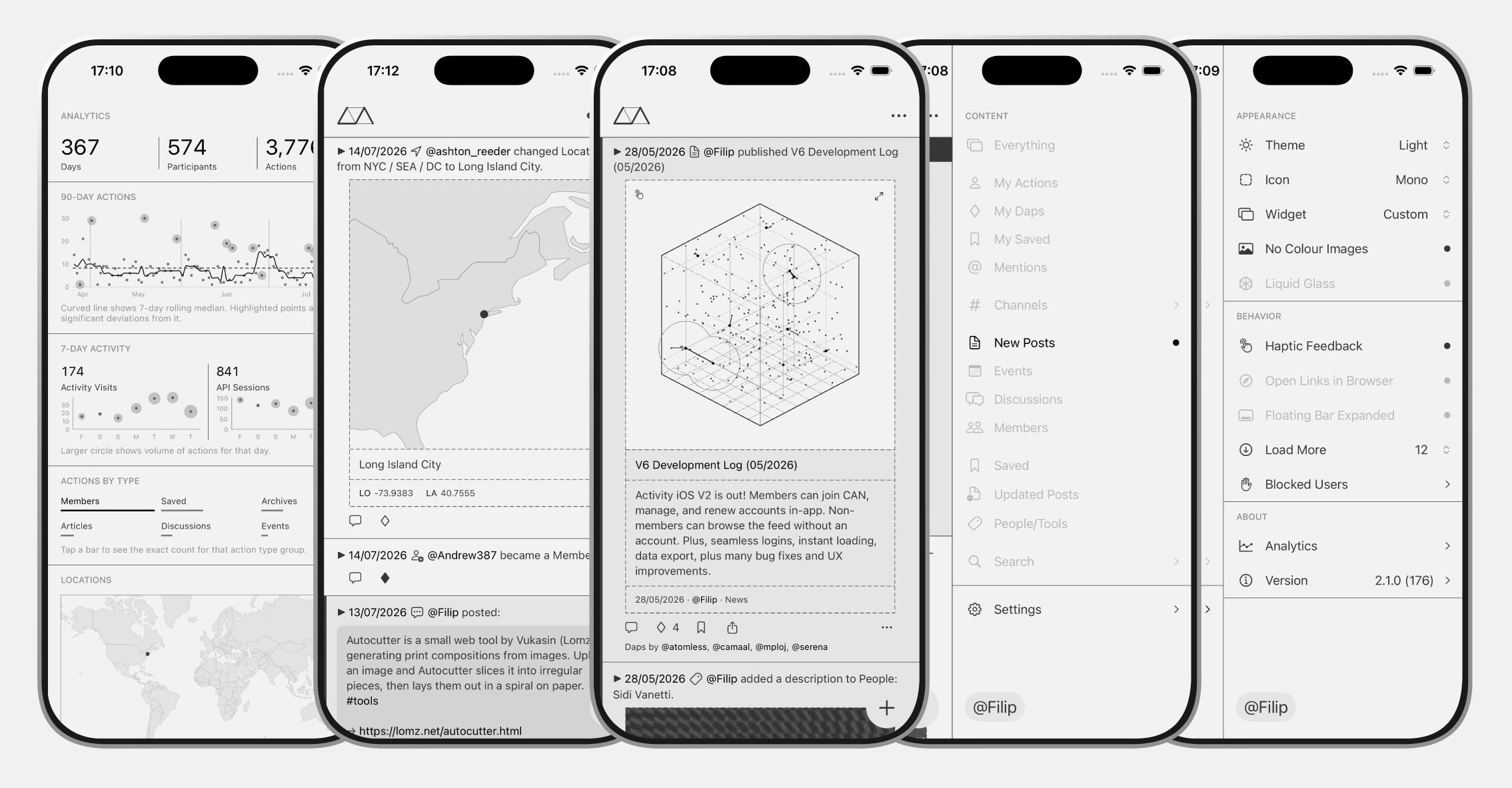
Activities and Actions
User-Related Activities
| Action | Description | Card | Text |
|---|---|---|---|
| User Registered | When a new user registers. | – | ✔︎ |
| User Location Updated | When a user updates their location a card is displayed with the map and longitude/latitude of the city. | ✔︎ | ✔︎ |
| User Website URL Updated | When a user adds/changes/removes their website URL it tries to grab meta image tag, and if it exists, it will display it in a card. | ✔︎ | ✔︎ |
| User Bio Updated | When a user adds/changes/removes their bio, if bio exists it will display it in a card in italics. | ✔︎ | ✔︎ |
| User [X] Updated | Generic user profile field changes (e.g. TwitterX, Instagram, Other, etc.). | ✔︎ | ✔︎ |
| User Name/Email/Password Updated | Not Actioned | – | – |
Post-Related Activities
| Action | Description | Card | Text |
|---|---|---|---|
| Post Created | New post is created (not yet published). | – | ✔︎ |
| Post Published | Post transitions to “publish” status. | ✔︎ | ✔︎ |
| Post Updated | Published post is updated (title/content change). | ✔︎ | ✔︎ |
| Post Deleted | Post is moved to trash. | – | ✔︎ |
| Event Created | Name added event | ✔︎ | ✔︎ |
| Event Deleted | Event is moved to trash. | – | ✔︎ |
Content Interaction Activities
| Action | Description | Card | Text |
|---|---|---|---|
| Post Saved | User saves a post. | ✔︎ | ✔︎ |
| Event Saved | User saves an event | ✔︎ | ✔︎ |
| Post Unsaved | Not Actioned | – | – |
| Event Unsaved | Not Actioned | – | – |
| Clear Saved / Unsaved | Not Actioned | – | – |
| Comment | User leaves a comment via the popup. | ✔︎ | ✔︎ |
Member Interaction Activities
| Action | Description | Card | Text |
|---|---|---|---|
| Member Saved | User saves another Member | ✔︎ | ✔︎ |
| Member Comment | @notification optional | ✔︎ | ✔︎ |
Newsletter Activities
| Action | Description | Card | Text |
|---|---|---|---|
| Newsletter Subscribed | User subscribes to the newsletter. | – | ✔︎ |
| Newsletter Unsubscribed | User unsubscribes from newsletter. | – | ✔︎ |
Taxonomy Term Activities
| Action | Description | Card | Text |
|---|---|---|---|
| Term Created | New custom taxonomy term is created in People/Tools. | ✔︎ | ✔︎ |
| Term Description Added | Description was added to a term in People/Tools. | ✔︎ | ✔︎ |
| Term Saved | User saved a term – People or Tools | ✔︎ | ✔︎ |
| Term Comment | User leaves a comment on Term (People/Tools) via the popup. | ✔︎ | ✔︎ |
Keyboard Navigation
| Key | Behaviour |
|---|---|
| S | Activate keyboard navigation |
| D | Next Card |
| A | Previous Card |
| W | Scroll to top and disable keyboard navigation |
| ENTER | Go to selected Post |
Notes: Keyboard navigation only works when filters are disabled (Show All).
